For church services
Free Bible projector software for church, in your browser
Bible ProJection is free Bible projector software that runs in your web browser, so there is nothing to install and no account to make. Open it on the computer connected to your projector, send any verse to the second screen, and let AI Mode suggest verses as the speaker talks.
How Bible projection works
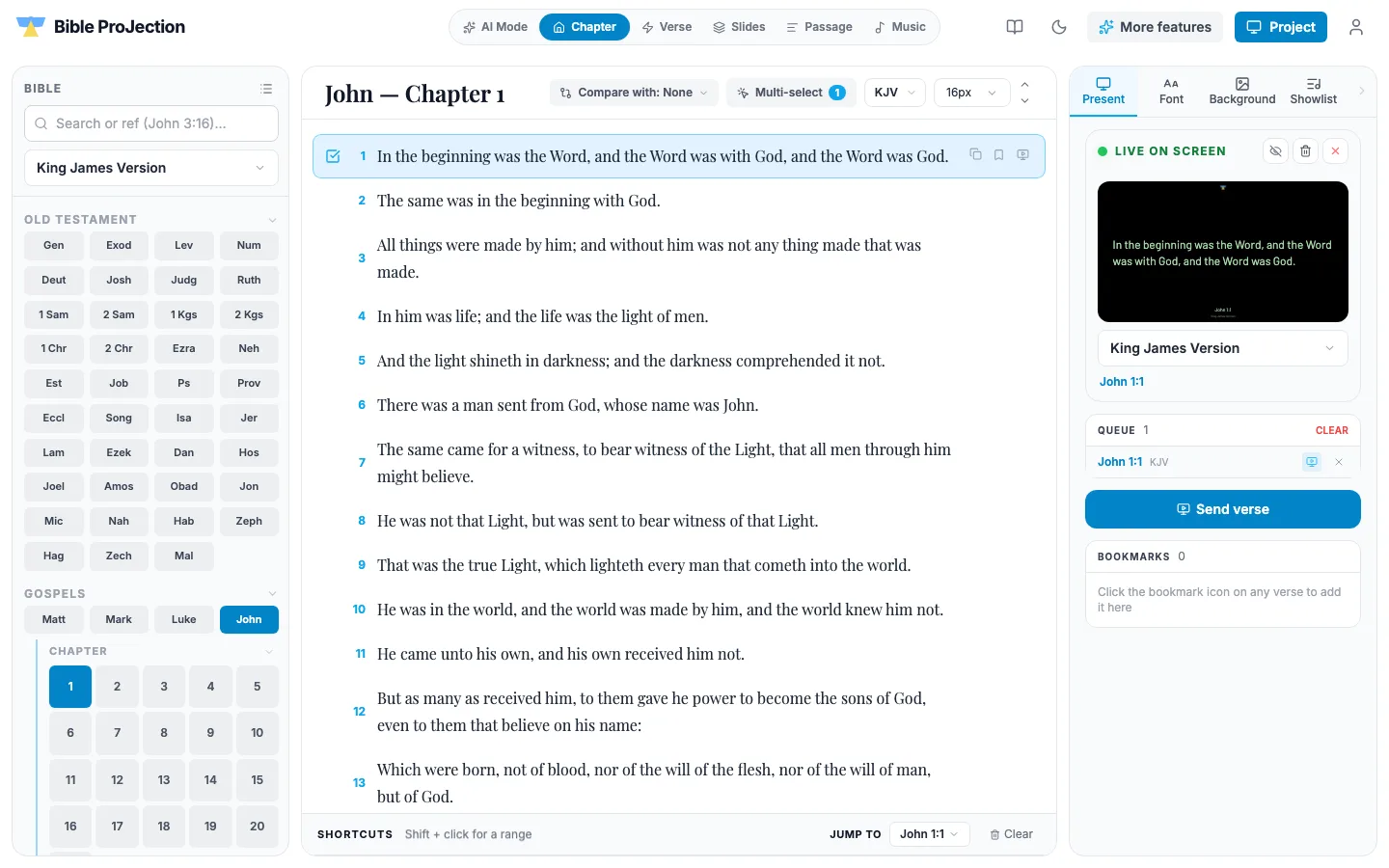
You run the service from the Project tab. Press the Project button in the top bar and a separate projection window opens. Move that window to your projector or second display and make it full screen. The congregation sees only that window, while your own screen stays private for searching, queuing and previewing.
A panel on the right always says whether something is live or nothing is on screen, so you never have to guess what the room is looking at.
Find the verse in seconds
Type a reference such as John 3:16, 1 Cor 13 or Gen 1 and you land on the verse. Book names are matched loosely, so short forms and small typos still work. Type anything else and it searches the text instead.
Before the service you can line verses up in a queue and send them one at a time. Slides mode also shows song lyrics you paste in and images you upload, so one screen covers the whole service.
AI Mode listens along
Press the microphone and AI Mode listens to the speaker, then suggests verses that match what is being said. When the speaker names a reference aloud, it appears as a card too. One click sends a suggestion to the screen.
It is a helper for the operator, so glance at a verse before it goes live. AI Mode uses your browser's speech recognition, which needs Chrome or Edge, and it understands English for now. Bible ProJection never records or saves audio.
Make it look right for your room
Choose the typeface, size, colours and alignment, add a background image with an overlay slider, place a logo, and show a clock or a reference bar. Changes appear on the projection window straight away. In the projection window, Esc clears the screen and B blanks it.
KJV, YLT, LSV, BAB, NASB 1995, AMP and NLT are all available, along with the Greek and Hebrew texts, and every one of them is free.
Questions people ask
Yes. Projecting, reading, studying and meditating are free and work without an account. A free account adds a few messages with the Gnosis study companion.
No. It runs in a modern browser such as Chrome, Edge, Firefox or Safari. AI Mode needs Chrome or Edge because it uses the browser's speech recognition. Native apps are coming soon.
Connect the projector as a second display on your computer, press the Project button to open the projection window, drag that window to the projector and make it full screen. Then send any verse from your own screen.
Yes. AI Mode listens through your microphone and suggests matching verses, and you choose which one goes on the screen. It matches quotations and named references, and an Enhanced engine for retold passages is available with a Pro plan.
Yes. Slides mode has a picker for Bible, Image and Songs. Songs are made from lyrics you paste in, and images come from files you upload. Both can be queued and sent to the screen like a verse.