A step-by-step method
How to study a Bible passage, step by step
To study a Bible passage, read it several times, note what it says, work out what it meant to its first readers, compare it with other Scripture, and then apply it. Free tools such as topic search, an interlinear Bible and a classic commentary can help at each step.
What studying adds to reading
Reading gives you the passage. Studying asks what it means and checks that your answer is right. Paul told Timothy to take that care.
Study to shew thyself approved unto God, a workman that needeth not to be ashamed, rightly dividing the word of truth.
Pray, then read it three times
Start by asking God to teach you. The psalmist did the same.
Open thou mine eyes, that I may behold wondrous things out of thy law.
Six steps through a passage
Choose a passage of a paragraph or a short chapter. John 15:1 to 11 works well, and the example below uses it. Read it three times and write down what you see.
Step one is to observe. Note who is speaking, who is listening, and what words repeat. In John 15 the word abide comes up again and again. Step two is context. Read the chapter before and after, and find out who wrote the book, who it was written to, and why.
Step three is to look at the key words. Choose one that matters and see what it meant in the original language. Step four is to compare Scripture with Scripture. Look for other verses that use the same word or speak of the same theme, because the Bible explains itself, and a verse should fit with the rest.
Step five is to read what others have written. Old commentaries are a good check on your own thinking, and where they disagree with each other it is a sign to slow down. Step six is to apply it. Write down one thing you believe now that you did not believe, or one thing you will do.
The tools, in the same order
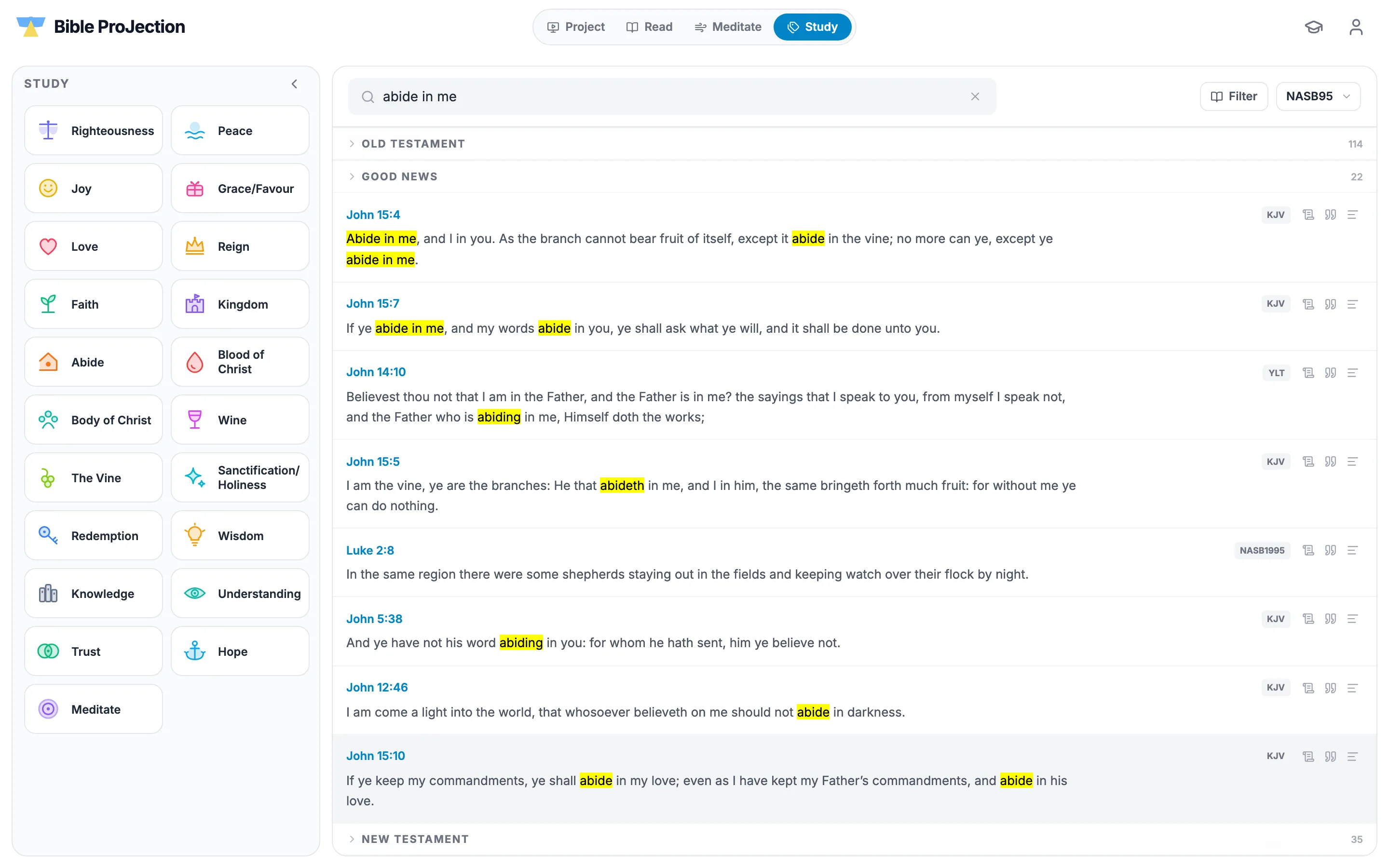
In Bible ProJection, the Study tab covers step four. Type a word such as abide and the results are grouped under Old Testament, Good News and New Testament, so you can see how a theme runs through Scripture, as in the picture above.
Interlinear mode covers step three. It sets a chapter word by word with the Hebrew or Greek, its transliteration, the English and its Strong's number, and Focus opens one verse with a card for every word. The Guide beside the reader gives an outline of the chapter from Matthew Henry's Concise Commentary, which covers step five. Compare with lets you read several translations together. All of these are free.
Checking your own conclusions
Be wary of a meaning that nobody held before you, or that rests on a single word. If your reading needs a verse to say something it does not plainly say, check it against the rest of Scripture and against what the church has taught. An AI tool, Gnosis included, is a helper and should be checked against the text in the same way.
Questions people ask
Read it several times, note what it says, learn its context, look at the key words, compare it with other Scripture, read a trusted commentary, and then apply it.
A topic search to follow a word through Scripture, an interlinear Bible for the original words, a classic public-domain commentary, and the ability to read several translations together. Bible ProJection has all four, free.
No. An interlinear Bible shows the Greek or Hebrew word with its English and a Strong's number, so you can see what a word means and where else it is used.
A single paragraph can take 30 to 45 minutes if you go through every step. You can spread the steps over several days.