Reading the original words
What is an interlinear Bible, and how do you use one?
An interlinear Bible prints the original Hebrew or Greek text word by word, with the English for each word directly beneath it. It lets you see what a verse says in the language it was written in, even if you have never studied Hebrew or Greek.
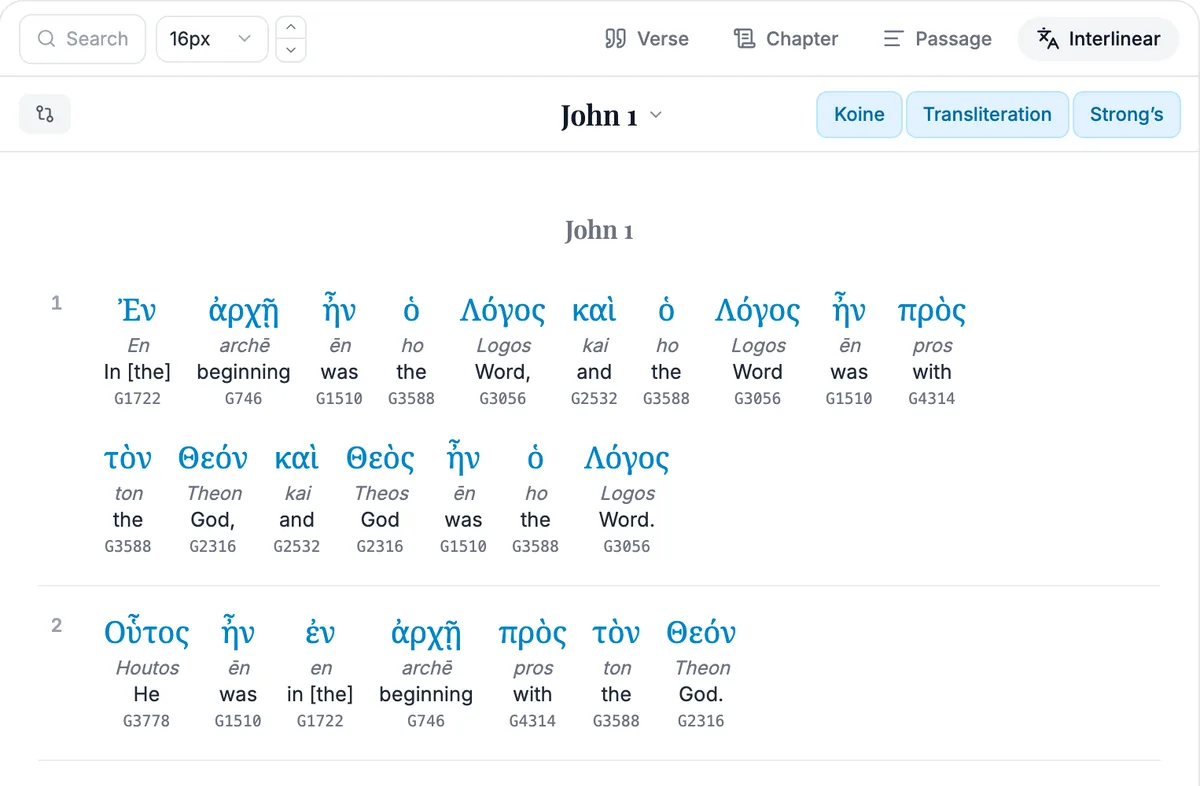
What you see on the page
Each word of the original sits in a small stack. The Hebrew or Greek word is on top. Beneath it come its transliteration, which shows how to say it in English letters, then a short English meaning for that word, then a Strong's number. A Strong's number is an index that lets you find the same word elsewhere in the Bible, even when it is translated differently.
The Old Testament was written mostly in Hebrew, and the New Testament in Greek. The English in an interlinear is not a smooth translation. It follows the original word order and gives the sense of each word, so it can read awkwardly. That is the point, because it lets you check the original behind a smooth translation.
A worked example: John 1:1
Here is how the verse reads in the King James Version.
In the beginning was the Word, and the Word was with God, and the Word was God.
What the interlinear shows you
In the Greek, the word translated "Word" is Logos (Strong's G3056), and it appears three times in this one verse. In a translation you see "Word" each time, but in the interlinear you can see that it is the same Greek word every time, so you can see the verse keeps coming back to one word.
Look next at the word translated "was". It is the same Greek word, ēn (G1510), every time in the verse, so a reader can see the pattern of the sentence. Then hover a word to see its grammar code, which says whether it is a noun, a verb, and in what form. You do not need to understand every code to benefit. The word and its number are the useful part.
An Old Testament example: Genesis 1:1
Hebrew reads from right to left, and the interlinear gives you the same stack for each word. In Genesis 1:1, the first word is bə·rê·šîṯ, with the meaning "In the beginning" and the number H7225. The verb that follows is bā·rā, "created", and the next word is ’ĕ·lō·hîm, "God". Seeing the verse word by word shows you that this short sentence has only seven Hebrew words.
In the beginning God created the heaven and the earth.
How to use one well
Pick a word that matters in the passage, such as a repeated word, and look at its Strong's number. Then search that number or the word elsewhere, to see where else it is used. A word means what it means in its sentence, so the meaning in the stack is a starting point. The surrounding verses decide how it is used.
In Bible ProJection, Interlinear mode sits beside Passage in the Read tab. You can switch the original text, the transliteration and the Strong's numbers on or off. Focus opens one verse with a card for every word, giving its form, its dictionary form, its meaning and how often it is used. The word data and the English under each word come from the Berean Standard Bible tables, which are public domain, and it is free.
Questions people ask
A Bible that sets the original Hebrew or Greek word by word, with the English for each word beneath it, so that you can see the original text next to its meaning.
No. The English beneath each word and its Strong's number are enough to start. You can learn the alphabet slowly as you go.
Yes. Bible ProJection has a free Interlinear mode for the whole Bible, with the Greek or Hebrew, a transliteration and Strong's numbers.
A number given to each Hebrew or Greek word in a standard reference, so you can find every place the same word is used, even where an English Bible translates it differently.